Tuesday, 18 January 2011

Research - Analysis of three advertisements that relate to our genre

Here are a few digipak advertisements from the same genre as my music video. All these artists are involved in the indie genre and their advertisements and digipak help to show this. These artists that i chose, use the same image that is on their digipak to advertise their release of there album. This helps the audience recognise and identify the digipak and connect it to the artists. Here are a few examples i researched that display this.


Plan B


Digipak

Above it shows the artists Plan B's digipak cover.


Advertisement
Above is the advertisement Plan B used to promote his digipak. It is the same image he used on his digipak this helps the intended audience to link him to his digipak when they see this advertisement.

Florence and the Machine


Digipak

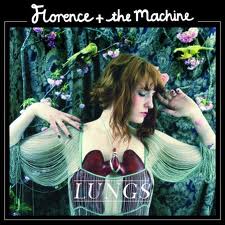
Above is the digipak for the indie artist Florence and the Machine. 


Advertisement

Above is the advertisement Florence and the Machine has chosen to used to promote her digipak. Although, the image is slightly darkened it is the exact image used in her digipak. So, the audience would immediately relate this advertisement to her digipak. 

Au Revoir Simone


Digipak

Above shows the digipak for the artist Au Revoir Simone.

Advertisement

Here is the advertisement Au Revoir Simone has chosen to promote her digipak. It is the same image used on her digipak, making it easier for her audience to find her digipak in the stores. 

Research - Analysis of three digipaks that relate to my genre

After finishing our music video, we now had to create a digipak and advertisement to help promote our artist. We started off by researching some digipaks of artists and advertisements that could be linked to the same genre of our video.

Here are some of the digipaks that i chose to look at;

Katy Perry - Teenage Dreams


Katy Perry has used a vibrant range of colours and exaggerated the tones of the colours to make them look airbrushed. I like the way the digipak cover portrays an image of the sky but the focus is on her because of her dark brunette hair. Katy Perry is known for being in the pop genre, which is obvious from the text she has chosen. Her digipak cover is coherent with her music video 'California Gurls' and this image is taken from that video as it is shows below.


Beyonce Knowles - B-Day (Deluxe Edition)


Beyonce Knowles has used an image of herself standing in front of an open field with the sky as her background image. She is know for her famous pop songs and her outrageously energetic videos. The digipak cover are significantly similar to her music video 'Deja Vu'. As it is shown she has linked her digipak image to clips in her video to help connect it to her as an artist. Here is her video for 'Deja Vu'.


Corinne Bailey Rae - The Sea


Corinne Bailey Rae has used the sky and nature to make her digipak cover background. Her calm attitude is perceive through her body positioning, which links to her music and the genre she is associated with. She is an indie artist and her choice of colour and text font helps to show this. Her digipak cover resembles her video for the song 'Put Your Records On'. Here is her video for 'Put Your Records On'.

Monday, 17 January 2011

Production - Analysis of one sequence from the rough cut


After receiving feedback from our teacher, we focused on the points in our video that we needed to change. A particular shot that we planned to change - due to the feedback from our teacher - was the shot at the end of our video. We decided it would be better if we filmed a shoot of our artists holding hands at the end. We decided on this because;
  • it gave us an alternative to end the clip
  • prevented us form re-using our previous clips
  • it also suited our song choice and helped develop the theme of 'love' further


Production - Feedback From The Rough Cut

After viewing our rough cut video to our teacher, she provided us with positive feedback to help improve our video. Here is the list of suggestions she though we should consider when producting our final edit:
  • Cut our clips to ensure they precisely match the beat of the music
  • Film new footage for the ending rather than reusing the same clip
  • Try to shorten the clip of the artist singing at the end
  • Find alternative ways of writing 'You Got The Love'
As a group, we began deciding on ways to incorporate the feedback we received into our final video. As a group we came up with these points:
  • Use clips of the artist singing 'You Got The Love' to provide various ways of showing different ways of writing the lyrics
  • Editing our clips between shots again to ensure it is precisely match to the music
  • Use a wider range of shots/angles to reduce the clip of the artist singing
  • Film a shot of the two main artists walking away holding hands to prevent us from reusing footage

Sunday, 16 January 2011

Feedback from draft evaluation

Hello group 6
Please find comments on your draft evaluations by clicking 'comments' under the relevant blog entries.
Remember that your final deadline is Friday 21st January at 4.30

Tuesday, 11 January 2011

Evaluation - Question 4.

What have you learned from your audience feedback?


Evaluation - Question 3.

3. How did you use media technologies in the construction and research, planning and evaluation stages?


Internet


I have used the internet to help me in various ways, especially with my research. Blogger has enabled me to record my progress while making my music video, digi-pak and advertisement. Google has helped me gather information and images from previous artists work which has helped me greatly. Finally I used Youtube to look at other music videos to gain inspiration.


Editing


I used Final Cut Pro to create my music video. By adding, cutting and placing various clips in certain places to create my music video. I then used Photoshop to create my Digi-pak and Advertisement. It enabled me to edit the photo by changing the levels and softness of the image that I used. Also by using Photoshop it enabled me to experiment with different fonts, colours and layouts. 


Camera


I mainly used the Camera to shoot my music video. I also used it for creating voiceovers for my evaluation. We used the Tripod to keep the Camera in specific positions which enabled us to film shots  perfectly. Obviously the Memory Card was inserted into the camera which recorded our work. We then  used the Digital Camera to take photos of us while we was filming, this was evidence to show that we actually filmed it.


These different types of technologies have helped me through the different stages of creating my music video.